See Your Tattoo Before You Ink It
Upload a photo. Pick a tattoo design. InkPreview shows exactly how it looks on your skin — in 10 seconds.
Free to try · No sign-up needed · AI-powered preview
A tattoo generator is a tool that turns words, a reference photo, or lettering into a tattoo design. InkPreview covers all five jobs that phrase can mean — AI design from text, photo-to-tattoo, an on-body simulator, fonts and names, and try-on previews — in one place, free, with no sign-up for your first three designs.
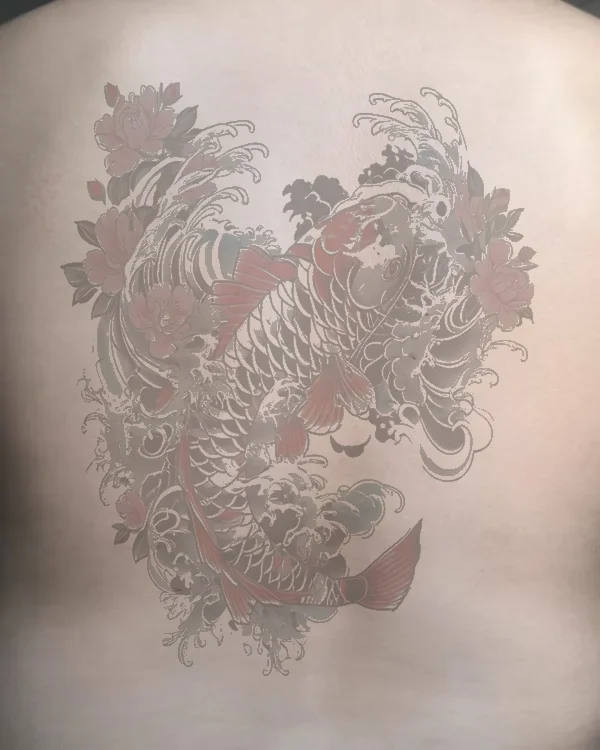
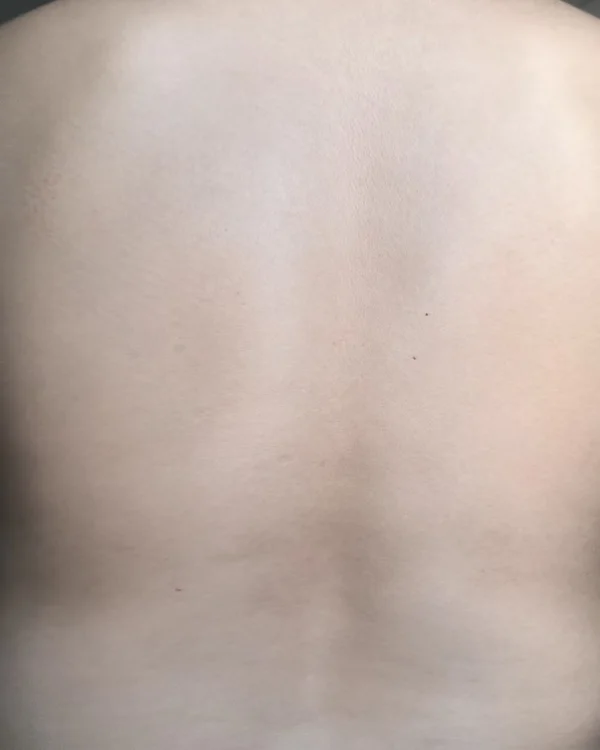
Three Steps. Ten Seconds.
No sign-up, no commitment. Just see what your tattoo could look like.
1. Upload Your Photo
Take a clear shot of the body area. (Avoid including your face for privacy.)
2. Choose or Generate a Tattoo Design
Pick from 20+ styles or describe what you want. AI builds it in seconds.
3. Preview on Your Skin
InkPreview maps the tattoo design onto your photo. Resize, rotate, try placements.
“Tattoo Generator” Is Five Different Jobs
Type “tattoo generator” anywhere and autocomplete splits five ways: ai, from photo, on body, font, name. Ten of the top results each sell exactly one of those and borrow the phrase for the rest. Here is the map — then pick the job, not the brand.
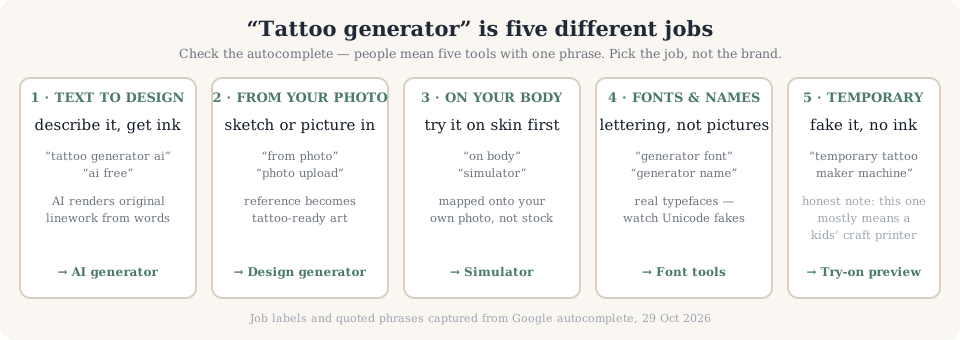
1. Text → design
(“tattoo generator ai”, “ai free”) You type words, AI draws original linework. This is where a picture is invented, not placed.
Free AI tattoo generator — 3 designs/day, no sign-up →2. Your photo → tattoo
(“from photo”, “photo upload”) A sketch, logo, or painting becomes tattoo-ready art. Different engine, different prompts from job 1.
Tattoo design generator from photo →3. On your body
(“on body”) Most generators stop at a PNG and put the design on a stock torso. The decision question — will my arm carry this — needs your own photo.
On-body simulator — your photo, not stock →4. Fonts & names
(“generator font”, “generator name”) Lettering is a typeface decision, not an image prompt — and half the “script font generators” online output Unicode fake characters, not real fonts.
Real-font tattoo generator (12 SIL fonts) →And job 5, said plainly: “temporary tattoo maker” autocomplete mostly means a kids’ craft printer, and “fake tattoo” means stickers. If that is your job, no generator here pretends otherwise — the try-on preview is the closest we get, and the honest answer is a pharmacy sticker sheet.
Everything You Need to Decide With Confidence
Tattoo Simulator
See any design mapped onto your actual body photo. Adjust size, angle, and placement. Our AI analyzes your skin tone, body curves, and lighting to produce a realistic tattoo preview that looks like the real thing. Perfect for trying placement ideas on your forearm, shoulder, back, chest, or wrist before visiting a tattoo artist.
Stencil Generator
Convert any image into a clean tattoo stencil you can bring to your consultation. Download as PNG. Uses edge detection and threshold controls to extract crisp outlines from photos, illustrations, or AI-generated designs. Upload a reference image and get a transfer-ready tattoo stencil in seconds.
Cover-up Designer
Upload your existing tattoo. InkPreview suggests cover-up designs that work with the existing lines and shading. A great option if you have an old tattoo you regret or want to refresh. Our AI considers the size, darkness, and style of your current ink to recommend designs that naturally blend with or conceal the original artwork.
Style Library
Japanese irezumi, geometric patterns, minimalist fine line, photorealism, watercolor splashes, blackwork, tribal, neo-traditional — browse hundreds of styles or search by keyword. Each style comes with cultural context and placement suggestions so you can choose a design that matches your personality and body area.
HD Export
Free tier: 512px. Pro: 1024px. Studio: 4K with no watermark. Download high-resolution previews to show your tattoo artist exactly what you want. Save time during consultations by bringing a visual reference instead of trying to describe your dream tattoo with words alone.
Batch Mode
Studio plan: generate up to 50 variations in one session. Great for comparing options before your appointment. Compare multiple tattoo designs side by side, adjust placements, and export a full mood board for your next tattoo appointment. Ideal for anyone who wants to explore many directions before committing to one design.
Why Tattoo Preview Matters
of people with tattoos regret at least one, according to a 2023 Pew Research study.
of U.S. adults have at least one tattoo — up from 21% in 2012, per Pew Research Center.
average preview time on InkPreview — see the tattoo design before you commit, reducing the chance of regret.
How We Help
InkPreview was built to solve a simple problem: you can't undo a tattoo easily. Traditional methods — verbal descriptions, Pinterest boards, printed stencils — leave too much to imagination. Our AI engine renders realistic previews on your actual photo, accounting for skin tone, body curvature, and lighting.
According to the American Academy of Dermatology, proper planning and placement are key factors in tattoo satisfaction. InkPreview helps you test placement and size before sitting in the chair.
InkPreview is built for planning: test placement, size, and style at home, then bring a clear visual reference to your consultation so you and your artist start from the same page.
Who Uses InkPreview?
InkPreview is for everyone considering body art: tattoo enthusiasts planning their next piece, first-timers weighing their options, and anyone who wants a realistic preview before committing. Whether you're planning your first tattoo or designing a full Japanese-style sleeve, our AI-powered platform helps you make confident decisions about body art.
First-time tattoo clients use InkPreview to overcome hesitation. Seeing a realistic tattoo preview of a butterfly on their wrist or a rose design on their shoulder removes the fear of the unknown. You can experiment with dozens of tattoo designs in a single session without any commitment.
Tattoo collectors who already have multiple pieces use the simulator to plan their next ink. They test how a new geometric design flows with existing work, or how a cover-up tattoo might look over an old piece. The batch mode in our Studio plan lets you compare 50 variations side by side.
Anyone prepping for an appointment can use the stencil generator to produce a clean outline from a reference image, so there is less guesswork when you arrive. The simulator also helps you show your artist realistic placement options during the booking process — a visual reference beats a verbal description.
Popular Tattoo Scenarios
Small minimalist tattoo
Fine line designs for wrist, finger, behind the ear, or ankle. Subtle and elegant.
Full sleeve tattoo design
Plan a cohesive arm sleeve with Japanese, tribal, or custom themes flowing from shoulder to wrist.
Meaningful memorial tattoo
Honor loved ones with portraits, dates, or symbolic designs like infinity knots and birds.
Cover-up for old ink
Transform faded or unwanted ink into a fresh cover-up design that works with existing lines.
Matching couples tattoo
Preview complementary designs on both partners before your anniversary or wedding.
First tattoo experiment
Not sure about placement? Try multiple body areas to find the perfect spot.
Plans for Every Stage
Start free. Upgrade when you need more images, HD exports, and no watermarks.
Free
$0
3 images/day · Watermark · 512px
Pro
$9.99
100 images/mo · No watermark · 1024px
Studio
$29.99
500 images/mo · 4K · Batch · Commercial
Common Questions
What is the best tattoo generator?
The honest answer depends on the job: text-to-design, photo-to-tattoo, on-body preview, lettering, or try-on. Most sites sell you one tool and call it the best. InkPreview runs all five jobs in one browser tab — free, no sign-up for your first three designs — so you can compare results instead of comparing claims.
Is there an app to make tattoo designs?
There are app-store apps, but a web generator updates daily and works on any phone browser with no install. Our generator is deliberately browser-only: your photo is processed in-session and never used to train models, which an installed app cannot promise as transparently.
How to generate tattoo ideas with AI?
Describe subject, style, and placement in plain words — 'a fine-line swallow, traditional style, inner forearm'. The generator renders variants; you shortlist two or three, then map the favourite onto your own photo in the simulator before booking a consult.
Is this a real tattoo?
No. InkPreview generates a visual preview on your photo. It's a reference tool — not a tattoo service and not medical advice.
How accurate is the preview?
InkPreview simulates placement, size, and general appearance. Skin tone, lighting, and body curvature affect results. Always consult a professional tattoo artist before inking.
Can I use the designs my tattoo artist gives me?
Yes. Upload any image to simulate it on your body or convert it to a tattoo stencil.
Is my photo stored?
Photos are processed in-session and deleted within 24 hours. We do not use your photos for training.
Can I use InkPreview designs commercially?
Studio plan includes a commercial license. Free and Pro plans are for personal use only.
What if I want to cover up an existing tattoo?
Use the Cover-up Designer. Upload a photo of your current tattoo and InkPreview suggests cover-up designs that work with the existing lines and shading.
About InkPreview
InkPreview is an independent tool built by tattoo enthusiasts and AI engineers. We are not a tattoo studio and do not provide tattooing services. Our mission is to help you make better decisions about body art by showing realistic previews before you commit.
InkPreview renders previews that account for a wide range of skin tones and body types. For tattoo-specific advice — pain management, aftercare, ink allergies — always consult a licensed tattoo artist or dermatologist.
Stop Guessing. Start Previewing.
Free to try. No credit card. Three images today.
Try InkPreview FreeAI-generated reference. Consult a professional tattoo artist before inking.