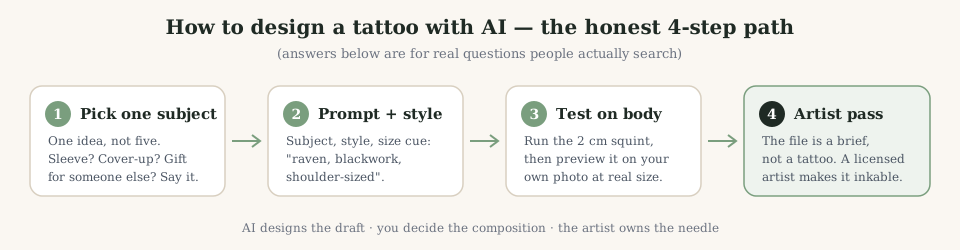
How to design a tattoo with AI?
Four steps, in this order: pick one subject (not five), write a prompt that names subject + style + size cue (“raven, blackwork, shoulder-sized”), generate 3–5 variants and change one word at a time between runs. Then stop treating the image as finished: run the 2 cm squint, preview on your own photo, take the best draft to an artist. The AI is the first draft’s artist; the tattoo’s artist is still human.
How to create a tattoo design with AI?
“Design” is the composition, “create” is the file — the workflow is the same: describe, generate, iterate on one variable, export. The difference that matters is where you stop. Stopping at a pretty render gives you wallpaper; going one step further — tattooability check, on-body preview, artist redraw — gives you ink. A generator worth using expects you to take that extra step and says so out loud.
Can AI design a tattoo for me?
Yes — as long as you can say what you want in a sentence. Give it subject, style and placement and it will draft compositions faster than a Pinterest scroll. What it cannot do is read your mind across a bad prompt: “make me something cool” returns something generic because you asked for generic. The designs that surprise people come from prompts with constraints in them — size, style, one subject, one emotion.
Can AI design a tattoo sleeve?
It can draft a sleeve concept — the full-arm composition, flow and focal points — but a wearable sleeve is engineering, not one image. Bones, muscle groups and how panels age together need an artist’s plan across sessions. The practical use: generate the theme and hero pieces, decide the story flow (wrist up or shoulder down), then let the artist map gaps and transitions. AI is mood-board speed, artist is fit-and-finish speed.
Can AI design a tattoo cover up?
Sometimes — and the honest tools explain when not. A cover-up must out-dark and out-busy the old ink, and it needs to be planned on your actual skin, not a blank canvas. AI can propose denser compositions (blackwork, ornamental, new-school) over a photo of your existing tattoo. But density limits come from the old ink’s colour and scarring, which the model cannot see. Treat an AI cover-up draft as a question to ask your artist, not an answer.
Where can I design my own tattoo for free?
Anywhere a generator offers a real free tier — read it carefully: “free” that ends at a sign-up wall or a watermark isn’t free, it’s a demo. A usable free setup: guest mode with daily generations, your own photo upload, and an on-body preview that works without an account. That is exactly how this site is built — 3 full designs a day, no card, no login. Compare it against any tool’s “free” before paying for one.
What app can I use to design a tattoo?
Any browser counts as the app — a tool that runs in one works on your phone already, with no install, no account and no store-commission subscription. Native tattoo apps mostly wrap the same image models behind a paywall and a 4.8-star self-rating. If you specifically want offline editing, that’s a drawing app (Procreate, IbisPaint), not AI. For generate → preview on body → export, a browser generator does the full job.
Can AI help me design a tattoo?
That is its best role. AI is excellent at the part humans stall on — getting from “something with a moth and my daughter’s birth year” to an actual composition you can react to. It is bad at the part artists own: whether that composition survives ten years of ink spread and your shoulder’s curvature. Use it to say no to drafts quickly; use an artist to say yes once, carefully.
How can I get AI to design a tattoo for me?
Prompt with constraints, then iterate single variables. “Phoenix, neo-traditional, half-sleeve, vertical flow” beats “cool phoenix tattoo” every time, because the first prompt already knows the canvas. Generate 4–6, keep two, merge what you like by re-prompting with both descriptions. If it drifts, shorten the prompt rather than lengthening it — long prompts make models contradict themselves. Finish where every honest workflow finishes: on your photo, then at the shop.
Which AI tool is best for tattoo design?
Judge on four features, not five-star screenshots: tattoo-style presets (fine line vs blackwork behave differently), photo input that restyles instead of filters, an on-body preview at stated centimetres, and a free tier you can actually exit with a file. Run one gauntlet — fine line, blackwork, your photo, text — on your top two candidates. Ten minutes beats any “best AI” list, including whoever wrote it.