AI Tattoo Generator
A tattoo AI generator is a design engine, not a tattoo. It turns your words or a photo into an original composition in seconds — linework, style and layout you can actually work with. What it cannot do is know how ink settles in skin, which is why every output here goes through a body preview and your artist’s eye before it becomes a tattoo.
Turn a sentence or a photo into an original tattoo design, then try it on your body before anyone reaches for a machine. Start below — it works right in this page.
Drop your photo here
Drag and drop or click to upload. JPG, PNG, HEIC up to 10MB.
Avoid including your face for privacy.
AI-generated reference. Consult a professional tattoo artist before inking. AI previews are approximations. Actual results depend on your artist's technique, ink, skin type, and placement.
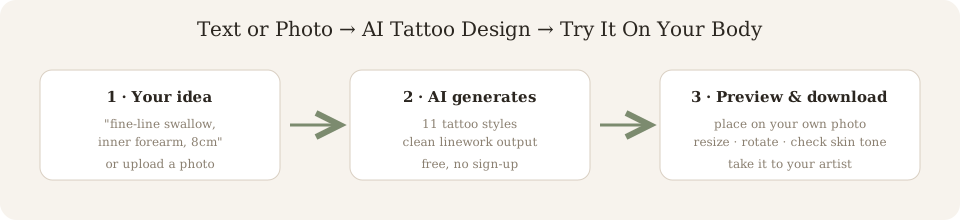
How to Generate a Tattoo with AI
Describe or upload
Type your idea as a text prompt, or drop in a photo, sketch, or logo to remix.
Pick a style
Choose from fine line, blackwork, Japanese, traditional and more — the generator rebuilds the art in that style.
Preview on your body
Place the result on a photo of your arm, leg, back or chest. Resize, rotate, and check it against your skin tone.
Download & iterate
Export the design, tweak the prompt, and regenerate until it matches what you had in mind.
AI tattoo generator from text
Text prompts are the fastest route when you know the subject but not the look. Write three things: what the tattoo shows, how it should feel, and where it goes. “A crescent moon wrapped in a single rose stem, fine line, about 8cm, inner forearm” gives the model subject, style, size and placement — four variables that otherwise get guessed. Keep it to one or two sentences; longer prompts start contradicting themselves.
AI tattoo generator from photo
Photo input is for when the design already exists somewhere — your dog, a family crest, a mural you photographed. Upload it and choose a tattoo style: the generator converts the image into continuous linework that a machine can actually follow, removing gradients your skin would blur out over the years. Portraits and landscapes work best in blackwork or fine line; logos and symbols handle any style.
What a good AI tattoo prompt looks like
- Name one subject, not five — “snake” beats “snake with flowers and a clock and a skull”.
- State style before size; the model draws linework differently for fine line vs traditional.
- Add a size cue (“wrist-sized”, “half sleeve”) so composition fills the right area.
- If the result is close but wrong, edit one word and regenerate instead of rewriting the whole prompt.
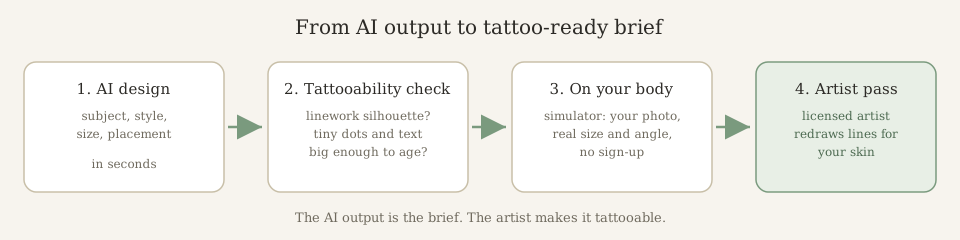
Is your AI tattoo actually tattooable? The 3-check filter
Artists reject most raw AI renders — not the idea, the file. Run your generated design through these three checks before booking anything.
1. The 2 cm squint
Shrink the design until the longest element is about 2 cm. Detail that turns to mush at that size will turn to mush on skin in ten years too. Dotwork and fine line survive this check; packed gradients never do.
2. Line or shade?
AI renders “shading” as pixels of soft gradient. A machine lays ink as points along a line. If your design’s depth comes from airbrush blur instead of visible strokes or dots, your artist has to redraw it from scratch — see what actually holds up in dotwork tattoo ideas.
3. One silhouette
Fill the design in black at thumbnail size. If you can still tell what it is — the shape reads — it will read on a moving body. AI loves cluttered compositions that only make sense at full zoom on a screen.
Tattoo AI vs ChatGPT: what’s actually different?
| Job | Generic chat bot | Tattoo-specific generator |
|---|---|---|
| Prompt vocabulary | You write “tattoo style” into a generic image bot and hope. | Styles are locked presets — fine line, blackwork, dotwork — tuned per style. |
| Linework discipline | Soft digital shading that no needle can copy. | Clean strokes from the start; less redrawing at the shop. |
| Iteration | Re-prompt the whole thing; the composition drifts. | Freeze the prompt, change one variable — see our variant-picking method. |
| Body check | None — you imagine it on your arm. | Simulator puts it on your photo, to size, in seconds. |
| Cost to try | Free-ish, with account + usage caps. | 3 designs/day as a guest — what’s free, exactly. |
We’ll be honest where the generic bot wins: brainstorming concepts and meanings. If you have no idea yet, start with the idea generator — it asks questions instead of drawing.
Tattoo generator AI on body: what the preview honestly shows
Every tool advertises “see it on your body”. Almost none tell you which parts of that preview are measurements and which parts are theatre. Here is the split — from the people who built one.
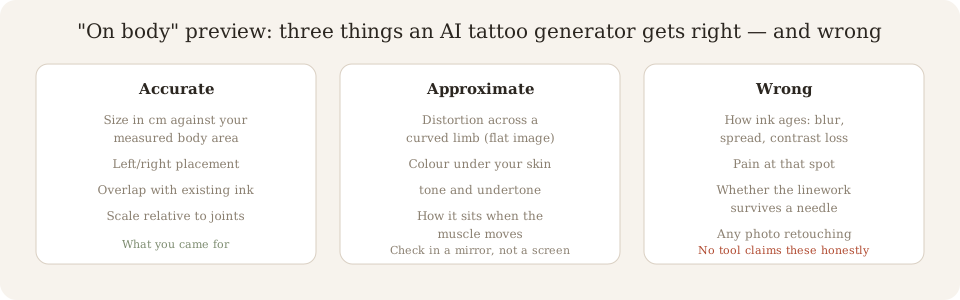
Accurate: the numbers
Centimetre size against a measured area, left-right placement, overlap with ink you already have, distance to joints. These are pixel-and-ruler facts — trust the preview for them, and write them into your artist brief.
Approximate: the drape
A flat image on a curved limb flatters you. Colour sitting under your undertone and how the composition moves with the muscle are estimates at best. View it in a mirror from arm’s length — if it still reads, it reads.
Wrong: the healed tattoo
No preview shows ten-year blur, spread or contrast loss, pain at that spot, or whether the linework survives a needle. Any tool that implies its preview is the healed result is selling you the render, not the tattoo.
Don’t trust reviews — run the ten-minute four-prompt test
“Best tattoo generator AI” lists are usually ad slots. The fastest honest signal is a four-prompt gauntlet you can run on any tool — including this one, right above this section.
- 1
Fine line: “single-line crescent moon, wrist-sized”
Checks whether the model can hold one continuous line — the most unforgiving test of linework discipline. Fussy hatching = fail.
- 2
Blackwork: “solid black raven, high contrast”
Checks for real negative space. Renders that look like grey smudges instead of packed black will heal muddy.
- 3
Photo upload: your own sketch or reference
Checks reinterpretation, not copying. Good output restyles your image; bad output just filters it.
- 4
Text-heavy: a name or short phrase in a script style
The AI weakness almost every generator hides. Garbled letters at this stage mean an artist redraw, guaranteed.
A generator that survives prompts 1–3 with clean output and tells you honestly that prompt 4 needs an artist’s pass is worth your ten minutes. Then size what survived with the body simulator before showing anyone.
AI tattoo creator, AI tattoo generator: same job, three questions that actually differ
People search an “ai tattoo creator” expecting a different product than a generator. There isn’t one — same engine, same output. What does differ, and what the autocomplete bar proves people want to know before clicking: three things.
Creator app?
There is no separate app to install, and we will not pretend otherwise to win the search. The creator runs fully in your phone browser — generation, on-body preview, download — no account, no store fee baked into the subscription. What you gain by skipping an app: nothing to update, nothing to rate, nothing to uninstall.
Creator online free?
Yes, in the literal sense: 3 designs a day as a guest, right here, zero fields before the first image. “Online free” on most competitor sites means free to look, register to create. The line-by-line tier comparison lives on our free generator page — including where the paid line actually is.
Creator from a picture?
Upload a photo, sketch or logo and the creator restyles it into tattoo linework — it reads composition, not pixels. This is the feature generic image bots market hardest and deliver worst: if your upload comes back as a Pinterest filter, that tool copy-pasted an image, it did not create a tattoo.
Searching an AI tattoo maker? There are two makers — sort yours out
“Maker” is the third marketing name for this page’s job: describe it, get a design. Nobody needs a separate product for that. But the autocomplete bar says a real share of maker searches mean a stencil maker — a different tool that turns a design you already have into a transfer-ready outline. One word, two jobs:
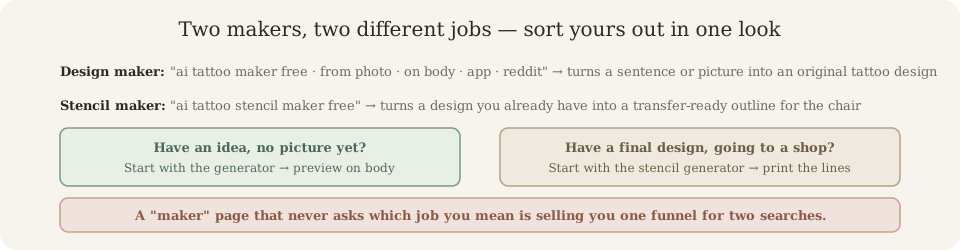
Idea → design: you want this page
Type a sentence or upload a photo, get original linework, check it on your body. The maker above the fold on this page is that tool — 3 guest designs a day, no fields. If you came from a “maker” search: you are in the right place, this is the maker.
Design → stencil: you want the stencil generator
You already have a final artwork and need it as clean lines for the chair. That is the stencil generator — a print path, not an idea path. Running a finished design through a design maker instead would just remix something you already settled.
Every maker-worded question — free tier, app, from-photo, on-body, the stencil fork — is answered in ten short Q&As on our AI tattoo maker questions page.
“AI tattoo designer” is the fourth name for this engine — and it drags in two extra questions
Generator, creator, maker, designer: one engine, four marketing labels. The first three ask what the tool does. “Designer” sounds like a person, so it smuggles in two things the autocomplete bar proves searchers want answered before clicking — and that vendor pages on this word skip.
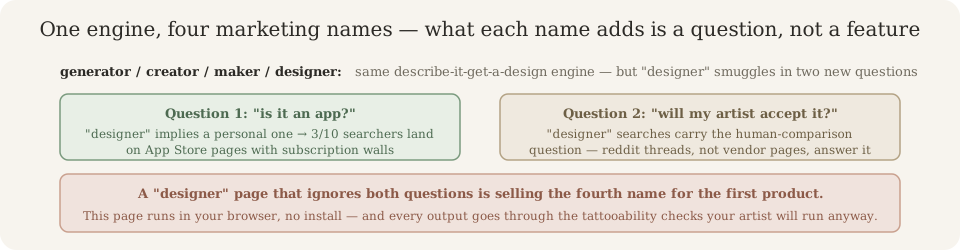
“Is it an app I install?”
Three of the top ten results for this search are App Store listings — the word “designer” implies a personal one you carry. The honest answer is no: this designer runs in your phone browser, no install, no store fee baked into a subscription, no review wall gating updates. The app results all sit behind auto-renewing paywalls; the web tool does the same job free, three designs a day.
“Will my artist accept it?”
A human “designer” comparison makes searchers suddenly care what shops think — and the honest answer is that many artists refuse raw AI renders. Not the idea, the file: gradients a needle can’t follow, detail that collapses at real size. That’s why every output here runs through the four-prompt test and tattooability checks further up this page — bring your artist a draft they can work from, not a picture they’ll reject on sight. Cover-up work has its own limits — what AI cannot see about old ink.
“Can AI design a tattoo for me?” — yes, with those two limits stated. The designer-worded Q&A set (for me / sleeve / cover up / from photo) is answered in the FAQ below and on the design-with-AI questions guide.
Frequently Asked Questions
How does the AI tattoo generator work?
Describe the tattoo you want in plain words — 'a fine-line swallow on the forearm' — or upload a reference photo. The model renders a original design in the style you pick, and you can place it on your own body photo with the built-in simulator before you download.
Is this AI tattoo generator really free?
Yes. You get 3 free generations per day as a guest, no account and no credit card. Paid plans remove the watermark and raise the daily limit.
Can I generate a tattoo from a photo?
Yes. Upload any image — a sketch, a logo, a painting — and the generator reinterprets it as tattoo-ready linework. Photo-to-tattoo works best with high-contrast reference images.
What styles can the generator produce?
Blackwork, fine line, traditional American, neo-traditional, Japanese, geometric, ornamental, minimalist, floral, anime and more. Each style changes line weight and shading behavior, not just a filter.
Can I give the AI a tattoo prompt like ChatGPT?
The input box is a plain-text prompt. Write it conversationally: subject, style, size, placement. 'Small sacred heart, blackwork, wrist-sized' works better than one-word prompts.
Is an AI tattoo design safe to get inked?
Treat every output as a starting draft. Show it to a licensed artist — they will adjust line thickness, negative space, and sizing for your anatomy before the machine touches skin.
Do AI tattoo generators work?
For the design stage, yes — an AI tattoo generator reliably produces original compositions you can iterate on in seconds. Where it stops working is the translation to skin: raw outputs often carry gradients, micro-detail and text too small to hold up under a needle. That is why the honest workflow is generate → tattooability check → artist pass, not generate → book appointment.
Is tattoo AI legit or just a hype tool?
Legit as a briefing tool, not as a finished tattoo. The models are the same image generators used for concept art — they were not trained on how ink settles in skin. InkPreview's take: the AI does the composition, a size/placement simulator does the reality check, and your artist does the final drawing. Any tool promising a shop-ready tattoo in one click is selling something.
Are AI tattoos bad?
There is no such thing as an 'AI tattoo' on skin — there is only an AI design an artist inks or refuses. Bad outcomes come from walking in with an unedited render that has blowout-prone packed detail or blown-out negative space. The same design, redrawn to tattoo linework rules, inks cleanly. The question is not whether AI is bad; it is whether anyone checked the file before the machine turned on.
Which AI is best for tattoo design?
For tattoo-specific output, a generator built for tattoos beats a general chat bot: it knows style vocabularies (fine line vs blackwork vs dotwork), keeps linework clean and lets you regenerate one variable at a time. A general model like ChatGPT can draft prompt ideas but renders non-tattooable shading far more often. Try ours free — 3 guest designs a day, no sign-up — and compare against a generic image bot on the same prompt.
Can a tattoo generator AI put the design on my body?
Yes — that is the part most tools screenshot and nobody explains. A real on-body preview composites the design onto your own photo at a stated centimetre size, so scale, placement and overlap with existing ink are measurable. What no preview can show honestly: how ink ages, how the design warps when the muscle moves, or how it looks against your undertone once healed. Use it for size and position, not for the healed result.
Are AI tattoo generator reviews on reddit trustworthy?
Most 'review' threads are either people showing off one lucky render or accounts with a payout. Better signal: run the same four-prompt test yourself — fine line, blackwork, photo upload, text-heavy design — on any generator, ten minutes total. A tool that survives all four with clean linework is worth a trial; one that only nails the showcase prompts is a gallery, not a generator.
Is an AI tattoo generator free with no sign-up?
Plenty claim it; most ask for an email at the download button. Ours is guest-mode: 3 designs a day with zero fields to fill, watermark-free preview, and the body simulator works without an account too. The full breakdown of what 'free' actually includes per tool tier is on our free AI tattoo generator page.
Is there an AI tattoo creator app?
Not as a separate install — and that is deliberate. Everything the AI tattoo creator does runs in your phone's browser: generate, on-body preview, download. A store app would add an account wall, a subscription the store prices up, and review-gated updates for zero new capability. If a tattoo 'app' ranks by promising features the web tool already gives free, that ranking is a paywall, not a product.
Can an AI tattoo creator design a sleeve?
It can draft the theme and hero pieces — but a sleeve that flows across three sessions is artist engineering, not one image. Generate the compositions you like here, freeze the style, then ask your artist to map the panels to your muscle. The full honest breakdown of what AI can and cannot plan is in our sleeve-design Q&A: how to design a tattoo with AI.
How do I use an AI tattoo creator from a picture?
Upload the image and pick a style — the AI reads the picture as a composition brief, not a filter: your dog becomes linework a needle can actually follow, gradients included only in your camera. Best inputs are high-contrast and single-subject. If you have an old tattoo to hide instead of a picture to transform, that is a cover-up job — see the cover-up design guide for what the model cannot see.
Can AI generate tattoo ideas, or only finished designs?
Ideas are actually the stronger use. A finished AI render is a draft your artist will change anyway; generated directions — ten raven concepts in blackwork, three ways to combine a compass and a rose — compress the searching stage that eats weeks on Pinterest. Ask for breadth first, then regenerate the one direction that clicked until it holds at placement size.
Are AI generated tattoos actually any good?
As designs: frequently yes — composition and style land in seconds. As tattoos: never directly, because the model optimizes for screens, not skin. Every AI generated tattoo must pass three checks before a machine turns on: legible at final centimetre size, linework a needle can hold, anatomy-aware placement on your actual body. Our gallery page breaks down the four physical failure modes with the fix for each.
Is there a best AI tattoo generator app, or is web enough?
Web-first, and we say that as the people who chose not to ship an app. Browser generation, on-body preview and download need no install; a store version adds an account wall and a store-priced subscription for the same models. The one honest exception is live camera AR try-on, which no browser preview does yet. For everything above that, the best AI tattoo generator app is the tab you already have open — and the stage-by-stage comparison is on our best generator guide.
Which is the best AI tattoo generator free?
Judge 'free' as four separate claims, not one word: free to look, free to generate but gated to download, expiring credits, and a stated daily allowance that stays yours. Ours is the last kind — 3 guest designs a day, zero fields, and the body simulator isn't behind the paywall either. The full tier-by-tier map of what each label hides is on our free AI tattoo generator page, and the honest ranking method is on the best generator guide.
Is there an AI tattoo maker app?
Same answer as the creator question above, because 'maker' is that same third name for the same job: the maker runs in your phone's browser — generate, on-body preview, download — with no install, no account wall and no store-priced subscription. The one gap no browser closes yet is live camera AR try-on. The full maker-worded Q&A, including the stencil-maker fork, is on our AI tattoo maker questions page.
Can AI make a tattoo?
It can make the design; nothing online makes the tattoo — that is a licensed artist with a machine. 'AI tattoo maker' searches hide a second question too: some people mean an AI tattoo stencil maker, which takes a design you already have and returns a transfer-ready outline. Generator for ideas, stencil tool for the chair; the fork is diagrammed on the maker questions guide and answered line by line there.
Can AI create a tattoo design for me?
Yes, from a sentence or a photo — that is the entire job of this page: describe the idea, pick a style, get an original render you can preview on your own body before downloading. What it cannot do is promise the render survives skin: hairline detail and merged strokes fail at centimetre size. Twenty-four real AI generated tattoo designs, with the four failure modes and fixes, are on our gallery page.
Which AI tool generates tattoo designs?
Three kinds: a general image model with no tattoo tuning, a paid tattoo-specific generator, and a web tool with a free tier like this one — 3 guest designs a day, no sign-up, on-body preview built in. The honest difference is style discipline: tattoo-tuned models respect linework; general ones produce gradients a needle cannot follow. A stage-by-stage tool comparison, including where each free tier hides a paywall, is on our best AI tattoo generator guide.
Can AI design a tattoo for me?
Yes — describe the idea in one sentence or upload a photo, pick a style, and the designer drafts an original composition you can preview on your body and download. What it cannot do is decide for you: it produces variations, you choose, and a licensed artist has the final pass before skin. Three guest designs a day free, no account — start at the tool above this answer.
Is there an AI that designs tattoos?
There is, and several — but the honest map is three species: a general image bot that draws tattoos as a party trick, a paid tattoo-specific app, and a web tool with a free tier and a body preview like this one. “AI tattoo designer” searches mostly want the third one without paying for the second. The four-prompt test on this page scores any of them in ten minutes.
Can AI design a tattoo cover up?
It can draft ideas, but a cover-up is the one job AI loses by default: the model cannot see your existing ink’s density, scarring or colour shifts, and a render that ignores them gets rejected on sight. Use AI for composition direction, then let the artist work over the real skin — our cover-up design guide breaks down what the tool cannot see and why.
Keep Going
Free AI Tattoo Generator
No sign-up, no card — see exactly what the free tier includes.
Tattoo Simulator
See any design on your own body before you commit.
Stencil Generator
Turn your generated design into a transfer-ready outline.
Tattoo Ideas
Browse placement, sizing and cost notes by style.
AI Generated Tattoo Gallery
Real AI generated designs, previewable on your body — plus the four failure modes explained.
Best AI Tattoo Generator, Honestly
Why every ranking list is an ad — and the stage-by-stage way to pick instead.