Tattoo Preview — See It on Your Skin First
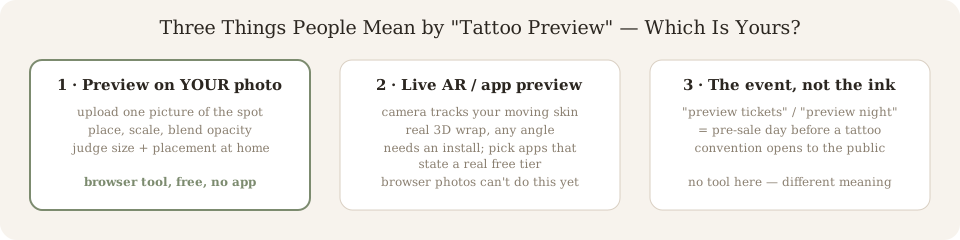
A tattoo preview is a try-before-you-ink image: a design placed on a photo of your own body so you can judge size, position and proportion before anything becomes permanent. The fastest kind runs in your browser — upload one photo, drag the design, scale it to centimetres. Ours is free, no app, no sign-up. But the word “preview” covers three different things; make sure you are reaching for the right one.
Drop your photo here
Drag and drop or click to upload. JPG, PNG, HEIC up to 10MB.
Avoid including your face for privacy.
AI-generated reference. Consult a professional tattoo artist before inking. AI previews are approximations. Actual results depend on your artist's technique, ink, skin type, and placement.
“Tattoo Preview” Is Three Different Searches
Type “tattoo preview” into Google and the dropdown immediately forks: “app,” “3d,” “on body” — and then “tickets,” “night,” and city names. Those are different intents wearing the same two words, and no tool page on the first search results even admits the last one exists.
1 · Preview on your own photo
Upload one picture of the spot, place any design on it, scale to real size. Judges the two decisions that actually prevent regret: where and how big.
Use it when: you have a design (or almost) and a body part in mind. The tool above does this free in your browser — start with the tattoo simulator if you want the full workflow.
2 · Live AR / 3D preview
A phone camera tracks your moving skin and pins the design on in 3D. It answers the one thing a still photo cannot: how the piece wraps and reads when your arm bends.
Use it when: placement is locked and you are checking flow across movement. Honest note: this needs an installed app and most charge credits — a browser preview (“app free” searches) is our lane.
3 · Convention preview night
“Preview tickets” and “preview night” are tattoo-convention admission: the earlier, usually cheaper entry day before a convention opens to the public.
No software helps here. If a dropdown full of “tattoo preview 2026” and city names is what you meant, you want the convention’s own ticket page — this is the wrong aisle, and we will say so out loud.
What a Tattoo Preview Can Settle — and What It Can’t
Trust the preview for
- Size at scale. A 6 cm design on screen is meaningless; 6 cm on your forearm photo is the real question.
- Placement. Which side of the muscle, how visible at work, whether it collides with existing ink.
- Proportion and flow. Whether the composition follows the limb or fights its shape.
Do not trust it for
- The healed look. Line spread, colour settling and fade are biology; no image simulates ten years of sun.
- Needle feasibility. Hairline detail that renders perfectly on screen may be tattooed at 0.3 mm and blur.
- Angles the photo hides. One still shot cannot show the full wrap — that is AR territory, or a mirror in the studio.
A preview is a placement decision tool, not a finished-tattoo promise. Bring the download to your consultation — a saved preview beats a vague description of one.
How to Preview a Tattoo on Your Skin (Three Steps)
Photograph the area
Even light, full body part in frame, a little space around it for scale. Filters and harsh shadows work against the blend.
Place a design
Pick from 480+ designs, upload your own artwork, or generate something new from the AI tattoo generator first — then try it on.
Scale, blend, download
Resize to centimetres, rotate along the body line, drop opacity until it reads as ink. Download and send it to your artist — not a screenshot of a Pinterest board.
No design yet? Browse first
AI generated tattoo designs by style in the gallery — pick, then preview.
Placement research
Compare pain, visibility and canvas size across eight spots — then preview on your own photo.
Preview approved? Make the stencil
Turn the design you settled on into a transfer-ready outline, free.
Tattoo Preview — Questions People Actually Type
What is a tattoo preview app?
Any tool that shows a design on skin before you commit. Two families: browser tools that composite artwork onto a photo you upload, and phone apps with live AR camera tracking. The browser kind needs no install and no account; the AR kind follows your body as you move. Search autocomplete splits them — “tattoo preview” pulls up “app” and “3d” as its top modifiers, which is exactly the fork this page walks through.
Is there a free tattoo preview app?
Yes, and the free part deserves scrutiny: many store apps are “free” to install but charge credits before showing a single result on your skin. Ours runs in your phone’s browser with 3 previews a day, no sign-up and no credit card — that is a real free tier, not a free download. Judge any app’s “free” by what you can see before paying, not by its install price.
What is a tattoo preview night or preview tickets?
Something entirely different: many tattoo conventions sell “preview” or “pre-sale” tickets — an earlier, often cheaper entry day before the convention opens to everyone. If you searched “tattoo preview 2026” or a city name plus “preview,” you are looking at event admission, not ink-on-skin software. No photo tool can help with that; the convention’s own site can.
How do I preview a tattoo on my skin?
Three steps, two minutes: photograph the area in even light, upload it, then drag the design to position and scale it to centimetre size while blending opacity until it reads as ink. That is what the tool on this page does free, no sign-up. If you want the design to move with your arm instead of staying on a photo, that needs a live AR app — a different product.
Which is the best tattoo preview app?
The best one depends on the decision you are actually making. Choosing size and placement? A photo-based browser tool you can use this minute beats any download. Checking how it wraps when you move? A 3D AR app. Browsing designs before anything touches skin? A generator plus a gallery. “Best” is a stage question, not a brand question — pick the tool matched to your stage.
Is an AI tattoo preview accurate?
Accurate about geometry, silent about biology. A good preview nails size, position and proportions on your specific photo — the three things flash sheets cannot show. It cannot predict healed result: line spread, colour settling, how fine detail fades over ten years. Treat any preview as a placement decision tool and the consultation as the feasibility check.
Your preview, on your skin, in two minutes
Upload one photo and preview any design on your body. Free, no sign-up required.
Open the Tattoo Simulator