AI Generated Tattoo Designs
An AI generated tattoo design is a draft, not a tattoo: the free gallery below is real model output you can preview on your own body, and every one of these designs still needs a linework check before ink. Browse what works, see the four ways these designs fail on skin further down, then take the survivor to your artist.
Tattoo Gallery
Browse AI-generated tattoo designs. Click any design to preview it on your body.
Loading designs...
Browse the gallery by tattoo style
Traditional Tattoo Designs
Bold black outlines, saturated reds and yellows, and time-tested symbols — anchors, swallows, roses, and banners. Traditional tattoo designs read clearly at any size and age well, which is why sailors and firefighters made them famous. Preview a classic piece on your arm before visiting a parlour.
Japanese Tattoo Designs
Irezumi-inspired work: koi climbing a waterfall, dragons coiled through sleeves, Hannya masks, and cherry blossoms drifting across the shoulder. Japanese tattoo compositions are built to flow with your muscles, so seeing the full layout on your own body first matters more here than with any other style.
Geometric Tattoo Designs
Sacred geometry, dotwork mandalas, linework animals, and precise polygonal fills. Geometric tattoo designs depend on symmetry and spacing — a pattern that looks perfect on paper can sit oddly on a shoulder blade. The gallery shows real proportions before you commit.
Minimalist Tattoo Designs
Single-line illustrations, micro symbols, thin-script dates, and small anchors behind the ear. Minimalist tattoos are the most-purchased first tattoo, and the most regretted when placement is off by a centimetre. Preview the exact scale on your wrist, finger, or collarbone in seconds.
Watercolor Tattoo Designs
Splash fills, pigment bleeds, and painterly florals without hard outlines. Watercolor tattoo designs live or die by colour contrast against your actual skin tone — the same blue looks different on fair, olive, and deep skin. Test the design on your own photo first.
Realism Tattoo Designs
Portrait shading, photographic animal eyes, and trompe-l'oeil textures rendered in fine grayscale gradients. Realism pieces are large investments of time and money, and small errors (scale, angle, placement) get magnified. A realistic preview is the cheapest insurance before booking.
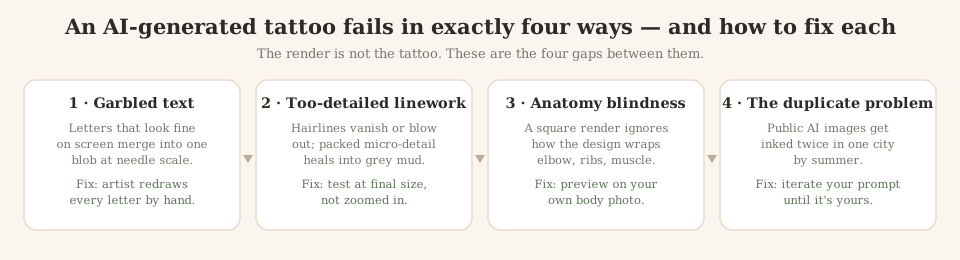
The four ways an AI generated tattoo fails on skin
Search “ai generated tattoo” with “reddit” or “concerns” appended — the autocomplete proves people do — and you land on the same argument from strangers every time. Here is that argument settled once, from the inside of a generator: every bad AI tattoo you have seen failed in one of four physical ways. None of them mean the design was doomed. All of them mean somebody skipped a check.
Text and script designs
The single most common regret. Models render letters as texture — they look like handwriting at 100% zoom and blur into one shape at wrist size. If your design has a name, a date or a line of poetry, treat the render as a placement mock only: an artist must redraw every glyph at the final size. Our generator’s stencil step is where that correction happens.
Detail that won’t heal
Rendered hairlines and packed micro-detail are physically impossible to hold in skin — ink spreads a fraction of a millimetre while healing, so tight detail greys out within a year. The honest test: shrink the design to its real centimetres and view it at phone distance. If it survives that, preview it on your body with the simulator — if it collapses, regenerate simpler.
Compositions that ignore your body
Models draw on a flat plane. A square render knows nothing about how the same lines wrap an elbow, stretch over ribs or distort when a muscle flexes — the failure mode behind the meme-worthy “it looked better on screen” posts. This is exactly what the on-body previews on this page exist for: click any design, place it on your own photo, see the wrap before the shop sees it.
The duplicate problem
A viral AI render shared publicly gets inked by strangers — two people in one city can end up with the same “custom” AI tattoo. Every image in this gallery is a case in point: it is a starting point many people can browse. Make yours yours by iterating the prompt — add a personal symbol, swap the style, change the layout — in the generator until the output stops looking like stock.
Searching “designs”, “images” or “ideas”? Three words, two jobs
The autocomplete around this keyword splits three ways — ai generated tattoo designs, ai generated tattoo images free, ai generated tattoo ideas — and not one generator in the search results tells you which page you actually want. Here is the split, plainly: “designs” and “images” mean you want to see finished work (that is this page — stay, click anything onto your own body, no sign-up). “Ideas” means you want directions to iterate, and a finished render is the wrong answer to that search — go prompt the generator for ten concepts and freeze the one that clicks. Searching with “reddit” appended, by the way, is neither: that is the trust question, and the four failure modes above are its settled answer.

More tattoo inspiration
Looking for a specific body placement instead of a style? Our placement guides cover tattoo ideas for the arm, shoulder, ribs, thigh, and wrist — with notes on pain, healing, and which designs fit each area. Every idea page links straight into the simulator, so a design you like becomes a preview on your own skin in under ten seconds.
Tattoo gallery questions
Are these AI generated tattoos free to use?
Yes. Every AI generated tattoo design in this gallery can be previewed on your own photo for free with the InkPreview simulator. The Free plan includes 3 image generations per day, no sign-up required — so you can also make your own variant of anything you see here.
Can I use a gallery design on my body without a tattoo artist?
InkPreview is a visualization tool, not a tattooing service. Use the gallery to choose and preview a tattoo design, then bring it to a licensed artist — you can also export a tattoo stencil from any design you like.
How often is the gallery updated?
New AI-generated designs are added as users create them. Each entry shows its style category, so you can browse traditional, Japanese, geometric, minimalist, watercolor, and realism designs separately.
Can I search for a specific placement?
The gallery is filtered by style. For placement-specific inspiration — ribs, shoulder, thigh, wrist — see our body-placement idea pages linked below, which cover pain level, healing, and design fit for each area.
Are AI generated tattoos any good?
As designs — often yes: a solid AI render can nail composition and style in seconds. As tattoos — not directly. The gap is physical: hairlines that vanish under skin, micro-detail that heals grey, and text that blurs. The winning workflow is AI draft plus artist redraw, and the losing one is walking in with a raw render.
Why do some AI generated tattoo designs look wrong?
Because image models optimize for looking good at screen size, not for surviving a needle. They produce impossible linework — merged strokes, gradients with no hard edge, anatomy that wraps a limb the way skin doesn’t. A design that looks crisp zoomed-in can be the exact design a tattoo artist has to redraw from scratch.
Can AI generate tattoo ideas, or only finished designs?
Both, and ideas are actually the stronger use. Generated finals are drafts a artist will change anyway; generated directions — “give me ten raven concepts in blackwork” — compress the searching stage. Browse this gallery for what clicks, then feed the style back into the generator as your prompt.
Can AI generate tattoo designs?
Yes — and everything in this gallery is the proof: real model outputs from a text prompt or an uploaded photo, in seconds. The caveat is about the next step, not the generation. An AI can generate a design; it cannot generate a tattoo. What lands on skin is decided by whether the linework holds at centimetre size, which is exactly what the four failure modes below teach you to spot.
What AI can I use to generate tattoo designs free?
Three honest kinds exist: a big general image model with no tattoo tuning (works, but ignores how skin ages), a tattoo-specific tool with a free tier, and a browse-only library. InkPreview is the second kind with the friendliest gate — 3 generated designs a day as a guest, no sign-up, no card — plus this gallery free forever. The tier-by-tier map of what each tool’s “free” hides is on our free AI tattoo generator page.