Tattoo Design Generator
An AI tattoo design generator turns one sentence — subject, style, placement — or one photo into several comparable design variants in seconds. On InkPreview you get 3 free generations a day as a guest, can re-run the same prompt across 11 tattoo styles, and score each design with a 4-point checklist before previewing the winner on your own body photo and exporting PNG + stencil for the shop.
The tool is below the answer. Use the same words every run — the style is the variable, not the prompt.
Drop your photo here
Drag and drop or click to upload. JPG, PNG, HEIC up to 10MB.
Avoid including your face for privacy.
AI-generated reference. Consult a professional tattoo artist before inking. AI previews are approximations. Actual results depend on your artist's technique, ink, skin type, and placement.
The 4-Point Checklist That Kills Bad Variants Fast
Every generator hands you pretty pictures. Almost none tells you how to throw them away. Score each variant against these four before it spends a day of your free allowance.
Silhouette test
Squint at the variant from across the room. If the shape alone doesn't read as your subject, no amount of shading saves it on skin.
Two-centimetre test
Shrink it to thumbnail size. Details that disappear under ~2 cm will disappear under sun and years of ink spread.
Flow test
Preview it on a body photo and rotate. A design that fights the muscle it sits on looks pasted, not placed.
Older-you test
You'll wear this at 60. Ask whether the line weight is thick enough to stay deliberate when skin loses elasticity.
What an AI tattoo design has to survive before it becomes ink
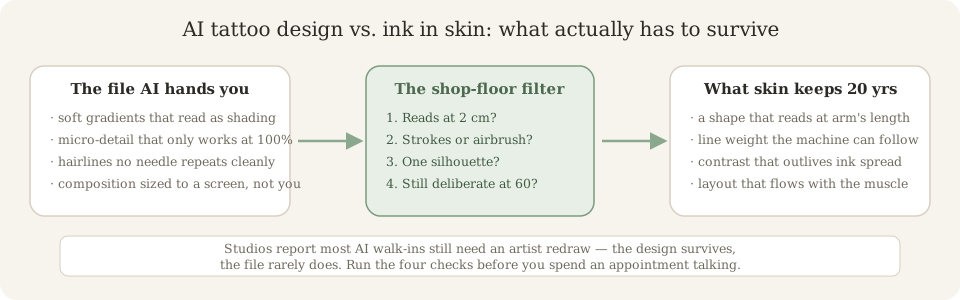
Studios on three continents now report a quarter to two-thirds of walk-ins carrying an AI-generated design. Most of those files still get redrawn at the shop. Not because the idea is bad — because a screen file and a skin file answer to different physics.
The redraw rate is the real metric
Generators advertise speed. Artists talk about translation. Gradient shading becomes packed black or stipple dots; hairlines become blowouts; a composition sized to 1024 px gets re-scaled to your limb. A good AI tattoo design isn’t one that looks finished — it’s one your artist can adapt in ten minutes instead of re-drawing from zero. That’s what the checklist above actually scores.
Walk in with a brief, not a commandment
The walk-ins that go best bring three things: the chosen variant’s PNG, a body-preview photo at size, and one sentence about meaning. The artist keeps your composition decisions and fixes the physics. Treat the AI output as the clearest reference your artist has ever been handed — not as a file they’re obliged to trace.
Not sure your design passes check two? The stencil generator converts a chosen variant into clean transfer linework — the same reduction your artist would do by hand.
An AI tattoo design generator ends where most tools stop
Search “design generator” and every result hands you a pretty PNG, then leaves you holding it at the shop. The real loop has two more stops: the four checks a screen file has to pass, and the stencil your artist actually transfers. Most sites are one tool; nobody bridges the whole path.
Why photo input changes the job
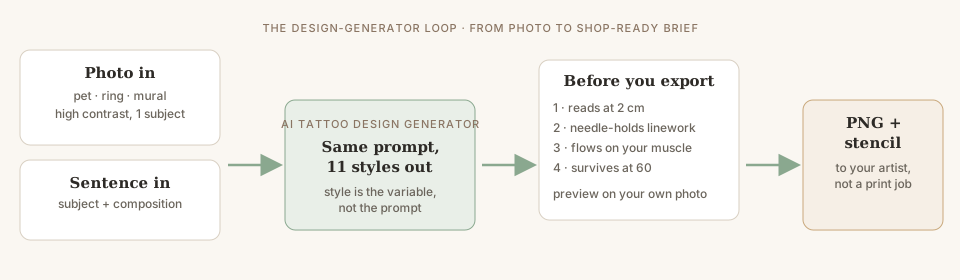
A sentence asks the model to invent; a photo asks it to translate — keep the likeness, replace the pixels with linework a needle can follow. That’s why memorial and pet tattoos are the top photo use-case, and why a blurry snapshot converts to mushy outlines. High contrast, one subject, then pick the style — the same 4-point checklist scores both entry points.
The export is a brief, not a transfer sheet
A generated PNG at 1024 px is a design reference. What goes on skin starts as a stencil — a clean single-weight outline, sized to centimetres, printed true to scale. Running your winner through the stencil step is the fastest way to see which details were load-bearing and which were screen noise.
Not sure which generator to run your prompt through first? The stage-by-stage comparison scores design generators on exactly this pipeline — generation, checking, handoff — not on brand claims.
The Variant Workflow, Step by Step
Describe once
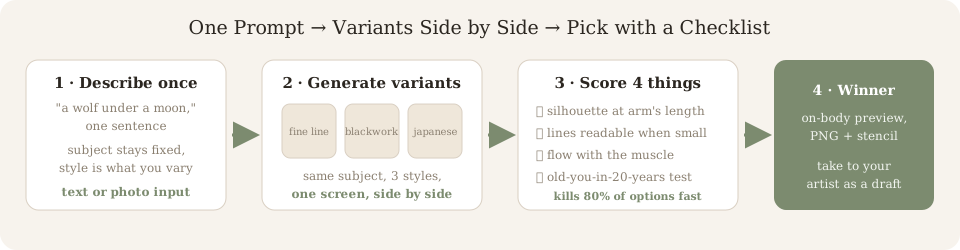
One sentence: subject + composition. 'A wolf under a crescent moon, vertical format.' Text or photo both work.
Vary the style
Keep the prompt frozen and switch styles — fine line, blackwork, Japanese, traditional and 7 more. Same idea, different hands.
Score side by side
Run the 4-point checklist on every variant: silhouette, small-size legibility, muscle flow, 20-years-older test.
Preview & export
Place the winner on your own photo, download the PNG, and pull a clean stencil outline for the shop.
Tattoo design generator free online
“Free online” should mean: opens in the browser, no install, no email, no card, works today. Guest mode on this site gives 3 full-resolution generations daily and never asks for an account — the full line-by-line allowance (including what stays unlimited after the 3 run out) is on the free AI tattoo generator page.
Tattoo design generator from photo
Photo input works two ways: as a subject (your pet, your late grandmother’s ring) the model re-inks it as tattoo linework; as a style reference it borrows composition and weight, not the artwork itself. Upload high-contrast images — a blurry snapshot converts to mushy outlines no artist can use.
Tattoo design generator text — and for names
Plain text prompts beat keyword stuffing: write the sentence you’d say to an artist. For name tattoos, type the name plus a format constraint (“the name Maya in fine-line script, small, with a single rose stem”) — and remember lettering lives or dies on spelling: proofread the PNG, not the prompt. Font-focused workflows are coming; today the generator handles lettered designs inside the styles above.
Can AI design a tattoo cover up?
Only as a conversation starter. A cover-up’s real inputs are the old tattoo’s pigment depth, scar tissue and how it has spread — none of which a text prompt contains. Use the generator to explore shapes dense enough to absorb the old work, then take options (not an answer) to the artist who can see the skin. The full before/after workflow, including what actually defeats black, is on our tattoo cover-up design page.
AI tattoo design from photo — the two directions
“From photo” hides two different jobs. Turning your subject (pet, ring, mural) into linework is routine here: upload, pick a style, re-ink. Turning an old tattoo photo into a cover-up plan is the one AI cannot do honestly — it never saw the real skin. Same tool, different expectations; the generator guide covers what photo input is actually good at.
Frequently Asked Questions
Can AI design a tattoo for me?
Yes — as a draft, and it's fast. Give the generator one sentence (subject, composition, style) and you get original linework in seconds. What AI can't do is size it to your anatomy or adjust line weight for your skin, so treat the output as a brief for a licensed artist, not the final flash.
How to design a tattoo with AI?
Describe the subject once, then vary the style instead of rewriting the prompt: run the same sentence through fine line, blackwork and Japanese and compare the three side by side. Most people iterate prompts endlessly when the real decision is style. Fix the subject, spread the styles, pick the winner.
How to design a tattoo for free?
Use a generator with a real free tier: InkPreview gives 3 full-resolution guest generations per day with no sign-up and no card, and body preview, stencils and downloads stay unlimited. Free-with-capture (email walls, trials) isn't free — see the free generator page for the exact allowance.
Can AI design a tattoo sleeve?
Piece by piece, yes. AI can't yet compose a cohesive multi-hour sleeve in one shot — it doesn't track flow across 30 cm of skin. Generate individual elements (central motif, fillers, connectors), preview each on your arm in the simulator, and let your artist sequence them into a sleeve plan.
What makes an AI tattoo design age well?
Readable silhouettes and line weight. Designs that look clean at 1024 px but rely on hairlines and tiny detail turn to blur in five years. Our 4-point checklist (below) is built around what survives ink spread: shape first, detail last, nothing finer than a needle can repeat.
Is a generated design good enough to take to my artist?
As a reference, better than a Pinterest screenshot: it's original, on-theme and already in tattoo linework. Bring the PNG plus your body-preview photo; expect the artist to redraw proportions to fit your anatomy. That's a collaboration, not a print job.
What is the best AI for tattoo design?
A tattoo-specific generator, for the design stage — it keeps linework clean and treats styles as locked presets, while a generic chat bot drafts ideas but renders non-tattooable shading far more often. There is no single best model; judge the file, not the brand. The honest side-by-side of what changes between them is on our AI vs ChatGPT table on the generator page.
Can AI design a tattoo cover up?
As a starting sketch, with a hard caveat: cover-ups are decided by what already sits on your skin — its pigment depth, scar tissue and shape — and no AI has seen it. Generate several directions to discuss, then let the artist choose what a needle can actually defeat. That flow is built step by step on our cover-up design page.
What makes a good tattoo design?
A silhouette that reads at two centimetres, line weight the machine can repeat, and a shape that flows with the body part it sits on. Everything else — colour, detail, density — is negotiable at the shop. That's why our checklist scores the file before you burn an appointment on it.
What is the best free AI tattoo design generator?
Best free means the free tier survives the design stage: full-resolution files, no email wall at the download button, and a stated daily allowance instead of expiring credits. InkPreview's guest mode is 3 designs a day across 11 styles with body preview included; on any other tool, run the four-prompt test before trusting the word 'free'. The stage-by-stage ranking method is on our best AI tattoo generator guide.
How to use AI to make a tattoo design?
One sentence in — subject, composition, placement — then change only the style, not the words, and compare the variants with the 4-point checklist above. Photo input works the same way: upload high contrast, single-subject, and the model re-inks it as linework. The full step order, including the design-to-stencil-to-shop handoff, is diagrammed in the photo pipeline section below.
Is there a tattoo design generator with no AI?
Yes — classic flash libraries and manual vector editors still exist, and 'no AI' usually means picking from what someone already drew instead of describing what you want. If that's the trade you want, our style galleries are hand-curated. If you want a sentence turned into original linework, that's the generator on this page — no AI can't invent your combination.
Keep Going
AI Tattoo Generator
The full generator guide — how text and photo prompts work, style deep-dive.
Free AI Tattoo Generator
Exactly what’s free, line by line: 3 a day as a guest, no card, ever.
Tattoo Simulator
Run the flow test properly: place any variant on your own photo, unlimited.
Tattoo Idea Generator
No subject yet? The 3-question engine writes the brief before any design runs.